Adding Delegates and Team Members
Last updated: January 10, 2025
 Article Overview:
This article focuses on adding delegates and team members to your account and managing their access levels.
 What are Delegates and Team Members?
Delegates and Team Members are the two roles that you can assign to anyone who joins your team. They differ in the level of access they provide, so you should assign them accordingly.
Delegate: Has direct access to your account without a separate account or "instance" of their own.
Functions within your company as if they're logged in as you, with full privileges across all campaigns.
Can access and edit every campaign, and every setting in your account.
Member: Receives their own separate account, or "instance".
Can access and edit only the campaigns you choose to share with them.
Your lead allowance is shared between your account and theirs.
Responses from their leads are directed to their inbox, keeping interactions distinct.
How do I add Delegates and Team Members?
Step 1: Navigate to Account Settings
Go to the Account Settings tab, located at the top right of the page.
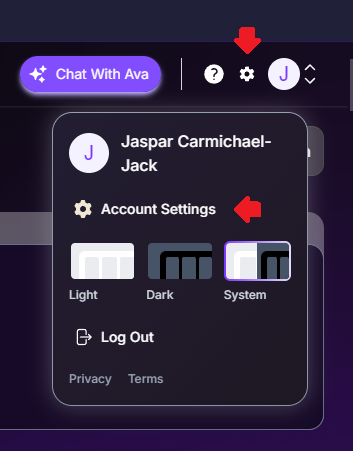
Select the Team section.

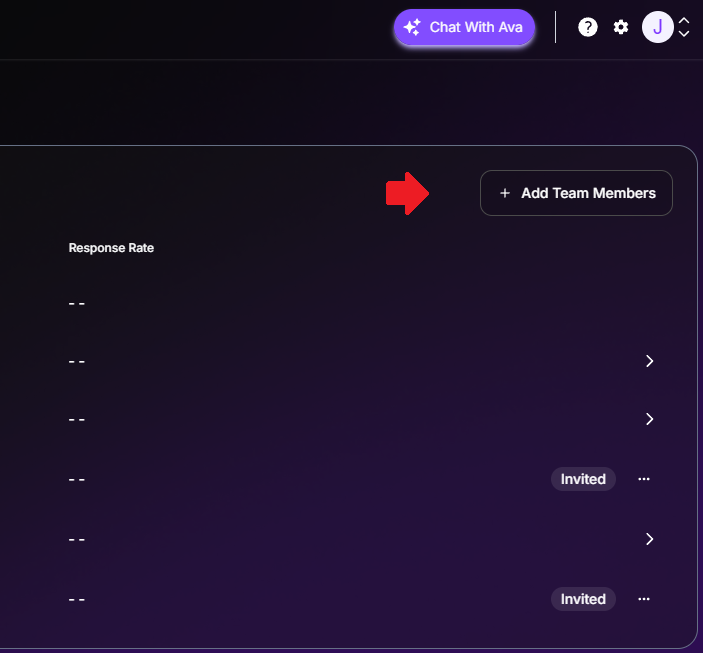
Step 2: Add Team Members
In the Team section, click "Add Team Members".
A dialog box will appear; enter the team member's email address.
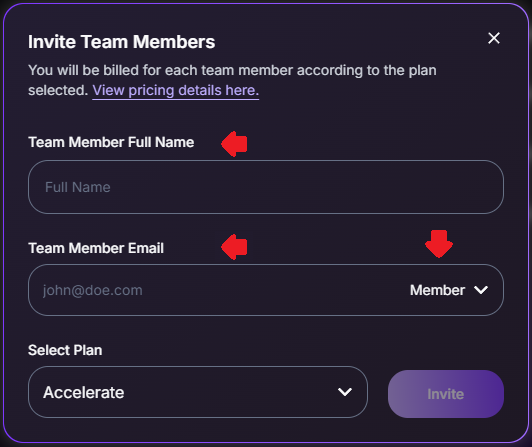
Choose the appropriate role for the new team member - if you are not sure what to select, scroll back up to our "What are Delegates and Team Members" section!
Click "Invite" to complete the process.
 Remember to always assign the role carefully based on the level of access and responsibility the team member requires within your account.
 Tips for Success:
Use the Member role for team members who need independence with specific campaigns.
Assign the Delegate role only to trusted team members who require full account access.
Need Assistance?
Contact our Support team if you have any questions or issues!