Running Ava on Copilot vs Autopilot
Last updated: February 14, 2025
🔍 Article Overview:
This article focuses on the key differences between Copilot and Autopilot modes and learning how to set up Ava to manage your sales outreach effectively.
🙋 What are Copilot and Autopilot modes?
Copilot Mode
In Copilot Mode, Ava generates personalized emails for your leads but requires your review and approval before sending.
How it works:
Automatically activated when ‘Full Autopilot’ is toggled OFF in settings.
Ava assists by handling the initial creation of emails, giving you the final say on what gets sent.
Autopilot Mode
Autopilot Mode allows Ava to autonomously manage your sales outreach and maximize sending efficiency.
Benefits:
Streamlines workflow by sending emails without manual approval.
Increases Ava’s outreach capacity while adhering to the predefined workflow.
Offers control to adjust campaigns at any time.
🙋 How do I enable Autopilot mode?
You can also follow along with our video tutorial here!
Step 1: Access Your Campaign
Navigate to the Campaigns page.
Look for campaigns marked with the sparkle emoji - these are already set to Autopilot.
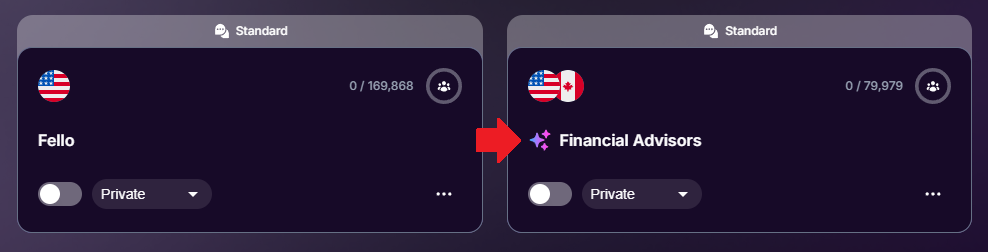
Step 2: Go to Campaign Settings
Inside the campaign, locate and click on the Settings tab.

Step 3: Enable Autopilot
ind the Full Autopilot switch and toggle it ON.
Ava is now authorized to send emails without further approval.

Understanding Your Control on Autopilot
Ava will manage emails according to the configured campaign workflow.
Ava won’t automatically respond to incoming emails—you retain this responsibility.
Make changes to campaign settings anytime.
Turn off Autopilot by toggling the switch OFF if you’d like to revert to Copilot Mode.
💡 Remember to always review and refine your campaign workflow before enabling Autopilot!
 Tips for Success:
Start with Copilot Mode to understand Ava's email generation before transitioning to Autopilot
Need Assistance?
Contact our Support team if you have any questions or issues!